NewFor halls
Close the hall for a day or more, and sort out what's booked
Close the hall for repairs, an election or a holiday, and deal with anything already booked on those days.
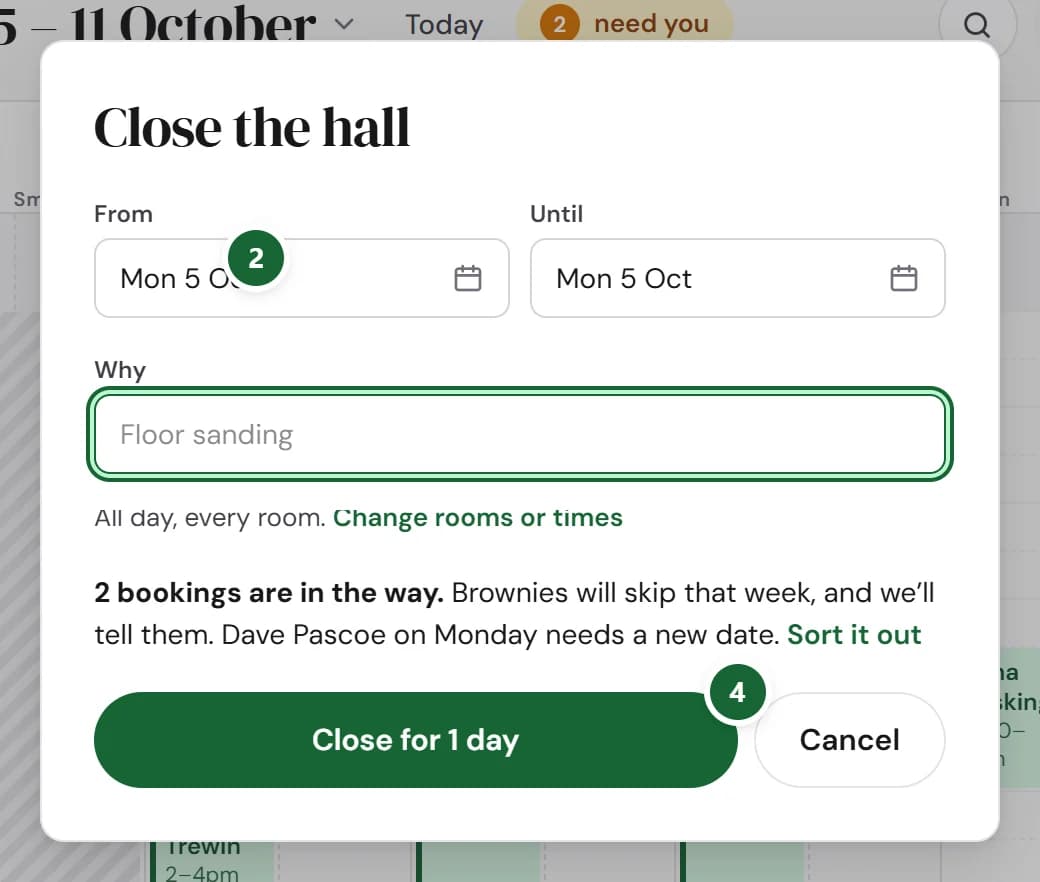
How to use it
- Step 1: Open Diary, press ⋯ at the top and choose Close the hall…
- Step 2: Choose From and Until, and say Why. Every room closes all day unless you press Change rooms or times.
- Step 3: If anything is booked then, press Sort it out and choose for each one, such as Move it, Cancel & email or Keep and close around it.
- Step 4: Press Close for and the number of days.
Good to know
- If hirers can see your diary, those days show as busy, on your listing and on your website's calendar. Your reason stays private.
- Emails to hirers wait 30 seconds, so you can still change your mind.
- Opening again early? Right-click the closed days and press Reopen.
Where to find itDiary
Show me Not on HallMatch yet? What HallMatch does for halls →