ImprovedFor halls
Numbers has its own place in the menu, from looking to booking
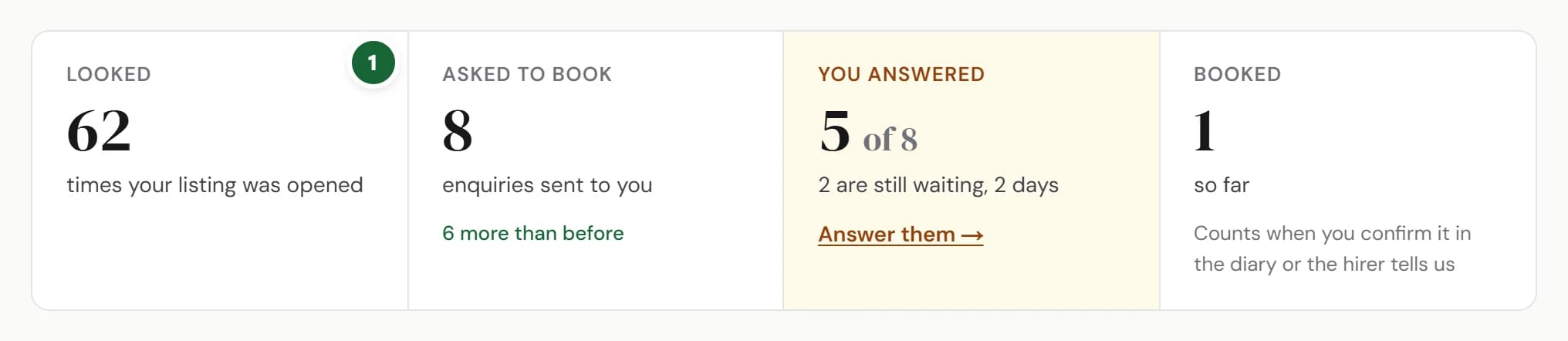
Numbers is in the menu on a computer too, and shows how many hirers looked, asked, got an answer and booked.
How to use it
- Step 1: Open Numbers. Hirers shows Looked, Asked to book, You answered and Booked.
- Step 2: Choose 30 days, 3 months or 12 months. Every figure on the page changes with it.
- Step 3: Under Week by week, point at a bar, or tap it on a phone, to see that week's visits and enquiries.
- Step 4: How full are we? has moved here too, under Hirers.
Good to know
- Looked counts each time your listing was opened, not different people.
- Booked counts once it's confirmed in your diary or the hirer tells us.
Where to find itNumbers, then Hirers
Show me Not on HallMatch yet? What HallMatch does for halls →